In this guide we will take you through everything and anything there is to know about Microsoft’s most popular ERP solution for SMEs around the globe, Dynamics 365 Business Central.
So the Big Question: What is Dynamics 365 Business Central?
Well, that might include another question, but for those of you who already know what an ERP solution is (for those of you who don’t, check out our handy post about (What is an ERP), then Dynamics 365 Business Central is Microsoft’s contender for the SME market globally.
As a solution, it’s been built to cope with many different business requirements out of the box, but can also be extended and customised where needed. That’s the quick summary, but there is so much more. So let us break down what else we’re going to cover in this guide:
- Core Capabilities
- AI & Innovation
- Deployment Options
- Licensing and Pricing
- Implementation Approach
- Ongoing Support
- Future Releases & Roadmap
Key Features & Capabilities of Business Central
Dynamics 365 Business Central is an all-in-one ERP platform. It brings together many business areas, which include:
Finance
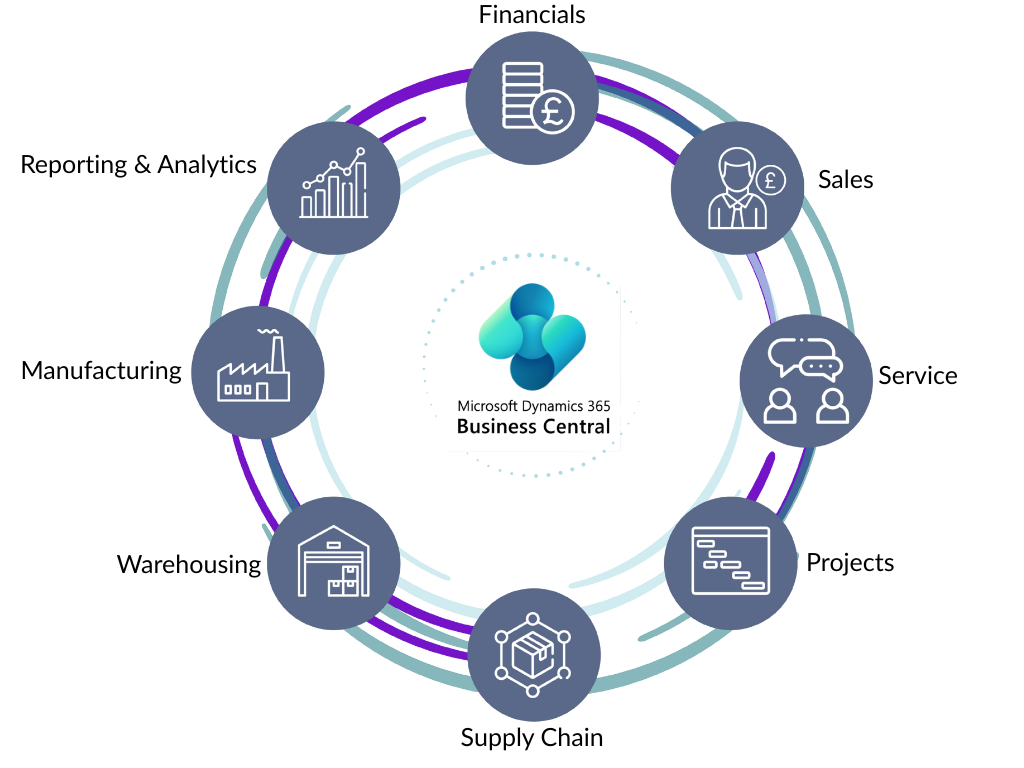
Everything a business needs from General Ledger, Accounts Payable, Accounts Receivable, VAT, HMRC VAT MTD, Bank Accounts, Sustainability, Budgets, Cashflow Forecasting, Reporting, Approvals.
Procurement and Purchasing
Management of Vendors/Suppliers, Purchase Price Lists, Purchase Quotes, Purchase Orders, Purchase Invoices, Purchase Return Orders, Purchase Credit Memos, Recurring Purchase Lines and more.
Sales and Marketing
Contact and Customer management, Interactions and Opportunities, Sales Price Lists Sales, Quotes, Sales Orders, Sales Invoices, Sales Return Orders, Sales Credit Memos, Recurring Sales Lines and more.
Inventory/Stock Management
Items and Stockkeeping Units, Multiple Units of Measure, Variants, Substitutions, and Items by Location. Replenishment and Planning, Lot and Serial Tracking, Item Categories, Attributes, and more.
Manufacturing/Production
Bill of Materials, Routings, Capacity Planning, Machine Centres, Work Centres, Families, Production Orders, Consumption, Output, Flushing Methods and more.
Service Management
Service Items, Service Contracts, Service Quotes, Service Orders, Resources, Scheduling, Reporting, Preventive Maintenance and more.
Warehouse Management
Stock Adjustments, Stock Movements, Stock Reclassification, Receipts, Put Aways, Movements, Picks, Shipments and more.
Project Management
Project Quotes, Projects, Planning and Tasks, Budget and Billable, WIP, Scheduling, Timesheets, Project Invoicing and more.
Alongside all of this comes powerful enhancements and additions that set Microsoft Business Central apart from other ERPs out in the marketplace. These include:
- Powerful Permissions and Role Management
- Full GDPR Compliance
- Data Change Logging
- Data Auditing
- Reporting out of the box
- Power BI Reporting
- CoPilot AI Agents and Chat
- Shopify B2B and B2C Connector
- Workflows and Approvals
- Power Automate Flows
- Integration to Microsoft/Office 365
- Excel Integration
- Filtering and Views
- User Personalisation
- And more on the horizon…
The list of features is endless and is constantly being updated. We’ll keep the above updated as Microsoft announces more features.
Using CoPilot AI in Microsoft Business Central
One of the biggest and latest innovations from Microsoft is the introduction of it’s AI, CoPilot. CoPilot has been introduced into Business Central in several ways. We’ll break them all down below.
Copilot Chat for Business Central
 CoPilot Chat for Business Central is essentially an AI-powered assistant directly embedded within the Business Central UI. The chat area is similar to that of something like you would see in ChatGPT interface, except the prompts at this stage need to be more specific requests, as ultimately CoPilot is working with Business Central data and functionality. The chat has been designed with several possibilities. Here’s what you can do:
- Quickly and easily find business data for your company. Essentially, a Google search for your data. An example prompt could be something like “Show me the latest sales order for X”, where X is a customer name in Business Central.
- Analyse or organise data. Simply ask it to group data based on certain fields or even do calculations like additions or averages for you. It then generates what is known as an analysis tab (Excel-like view) to show the results.
- Ask it how to use the system or set up a new area altogether. Prompts like “Help me understand dimensions” or “How do I post a sales order” return a series of helpful steps for a user to follow or direct you to more details in specific Microsoft Learn documentation.
- Understand how a field should be used. Fields across the system now have a prompt for “Ask CoPilot”. This opens the chat tab where CoPilot then explains the field to the user. It also provides any relevant links to articles or Microsoft Learn documentation to provide more useful information.
Business Central CoPilot Agents
The next stage of the AI-powered ERP era is the introduction of CoPilot agents. This is essentially AI assistants carrying out tasks for users. Where they would spend hours, if not days, on something, the CoPilot AI Agent would take over the task and even communicate with external parties like Customers and Suppliers. This is still relatively new, but what is available right now is as follows:
Sales Agent
The Sales Agent in Business Central is an agent used to handle customer enquiries and place orders. This is done by connecting to a mailbox that receives enquiries. The sales agent will then communicate with any customers making an enquiry. It will first produce a quote if enough information has been provided.
This will also attach a PDF version of the quote to the email. If the customer accepts the quote, we will turn it into an order. A PDF order confirmation will then be sent to the customer. The Sales Agent will read all emails from the customer and respond to all emails back to the customer. A user can review and edit all emails created by the Sales Agent before they are sent to the customer. Time being used on data entry, data finding and writing emails is ultimately transformed and automated by simply reviewing rather than building from scratch.
Payables Agent
The payables agent is much the same but more focused on the creation of Purchase Invoices. This is also done by reading a mailbox where invoices can be received by the agent. The agent then goes off and extracts all the information from the invoice and finds the Vendors or creates a new one. Then creates a Purchase Invoice from the extracted invoice, ready for use to post. During the process, much like the Sales Agent, a user can review and confirm what the agent is doing and make amendments where necessary. Microsoft have provided a useful flowchart to explain it in more detail below.
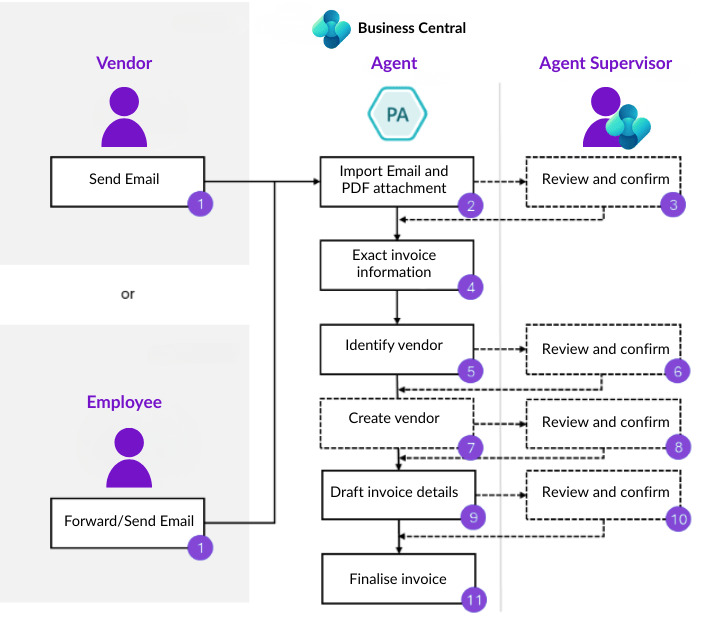
Both the Sales Agent and Payables Agent are in public preview right now. So functionality and usage are subject to change.
Analyse Data with CoPilot
Data analysis in Business Central has been transformed by CoPilot’s analysis assist feature. This tool works directly on any list page within Business Central. You can create analysis tabs without exporting to Excel or building complex views manually.
How it works
Open any list page in Business Central (Items, Sales Orders, Purchase Invoices, etc). Select the CoPilot icon and choose “Analyse list”. You can then describe what you want to see using natural language. Examples include:
- “Show me vendors by location sorted by purchase amounts”
- “Group items by category and show average cost”
- “Display customers with overdue invoices”
CoPilot interprets your request and builds the analysis tab automatically. It arranges fields into rows and columns, applies filters, and calculates totals or averages based on your description. The system understands groupings, pivots, and sorting requirements.
Once generated, you can refine the analysis. Add more details in the chat box and CoPilot adjusts the layout. You can also manually modify columns, filters, and data arrangements. CoPilot remains available to help with further adjustments.
All analysis tabs are saved. You can return to them at any time from the list page. The system also lets you navigate backwards and forwards through different versions you created during your analysis session.
Key benefits
- No need to export data to Excel for basic analysis
- Quick insights from your business data in seconds
- Natural language commands eliminate technical barriers
- Analysis tabs can be shared with team members
- Real-time data means your analysis is always current
This feature is available in public preview. It supports multiple languages but works best in English. Administrators can enable or disable the feature through the CoPilot & agent capabilities page.
Copilot Automations

CoPilot brings automation capabilities directly into Business Central through integration with Power Automate. You no longer need technical knowledge to build workflows and automation.
Creating flows with natural language:
Navigate to any area in Business Central where you want to create automation. Describe your automation requirement in plain English. Examples include:
“Send an email to the sales team when a large order is created”
“Notify me when stock levels fall below reorder point”
“Create a task in Teams when a purchase order needs approval”
CoPilot generates a draft Power Automate flow based on your description. This draft includes the trigger (what starts the automation), conditions (what must be true), and actions (what happens).
Refining your automation:
Review the generated flow within Business Central. CoPilot provides suggestions and helps you modify the flow using conversational prompts. You can add steps, change conditions, or adjust actions. All modifications happen through the chat interface.
Once satisfied, the flow is saved and activated. It then runs automatically based on your defined triggers and conditions. Integration with Power Automate:
The automation connects to Power Automate’s full capabilities. This includes connections to hundreds of other applications and services. You can send notifications via email, Teams, or Slack. Create tasks, update records, or trigger actions in external systems.
More advanced users can open the flow in Power Automate for additional customisation. The low-code interface provides drag-and-drop functionality. CoPilot continues to assist within Power Automate for further refinements.
- Approval workflows for purchases, sales orders, or journals
- Notifications when specific business events occur
- Data synchronisation between Business Central and other systems
- Scheduled reports sent to stakeholders
- Alert triggers for inventory, cash flow, or customer activities
Workflow templates
Business Central includes pre-built workflow templates for common scenarios. These cover approval processes, notifications, and standard business activities. CoPilot can help you select and configure the right template for your needs.
The automation builder is available to all Business Central cloud users. On-premise installations may have limited functionality depending on connectivity to Power Automate services.
This feature dramatically reduces the time and cost of automation. Business users can now handle tasks that previously required developers through simple conversations with CoPilot.
Deployment Options for Dynamics 365 Business Central

Business Central was formerly known as Dynamics NAV or Navision, which was and still is an on-premises hosted solution. This means you had to obtain a physical server and have your database and application hosted in your own infrastructure. However, with the rise of SaaS this is also now an option for Business Central. Below is a breakdown of what is possible:
On-Premise: It is still possible to host Business Central on-premise. This comes with it’s own challenges but generally the traditional method for Dynamics NAV and other traditional ERP solutions. The key thing for Business Central is some features are not making it to the on-premise solution. This is because of the reliance on some of these features requiring other online services or connections in order to work. Getting past on-premise firewalls and such are typically the reason for this.
Hybrid Cloud: This option is essentially on-premise however the server is hosted on a cloud service such as an Azure Virtual Machine. This means that instead of purchasing a physical server which needs to be stored and maintained, you simply rent server space using the Azure services. This will give you the ability to flex up or down the resources you require on the server and host your on-premise Business Central solution. However this is still very much on-premise and the challenge of features not existing on-premise is still present.
Cloud/SaaS: This model is by far the most popular for growing businesses and ultimately your solution is 100% hosted by Microsoft. This means they handle everything to do with the server, backups, migrations, etc. Essentially all typical costs of a physical server no longer exist and are rolled up into a per user cost from Microsoft. This options also means that you gain access to all features and get the latest updates every month, unlike on-premise which still requires a technical resource to carry out an upgrade for you. Microsoft also give guarantees about the cloud offering, the main thing you need is a reliable internet connection. This then means Business Central can be accessed anywhere from the world.
The deployment approach really depends on what you require as a company and how much control you want over the solution and where it is hosted.
We’re seeing a massive shift to the cloud and most businesses these days are not even considering on-premise as an option.
Those business still using Dynamics NAV on-premise are not required to move to Business Central or the cloud, however Microsoft are giving discounts to those businesses to help make the decision easier if cost is a major factor. Since this has changed several times.
Business Central Licensing Types and Costs
Business Central uses a subscription model based on named users. Each person needs their own licence. Licences cannot be shared but can be reassigned when someone leaves.
Current UK Pricing (November 2025):
Team Member: £6.60 per user per month
Essentials: £57.50 per user per month
Premium: £82.20 per user per month
Annual subscriptions are priced as shown. Monthly terms cost approximately 20% more.
Licence Types Explained:
Team Member
Limited access for users who need to:
- View reports and dashboards
- Approve workflows or timesheets
- Input basic data like time entries
- Read company information
Cannot perform full transactions or access advanced features.
Essentials
Full access to core business functions:
- Financial management (general ledger, accountspayable/receivable, VAT, bank reconciliation)
- Sales and purchasing (quotes, orders, invoices)
- Inventory and stock management
- Project management
- Warehouse operations
- Supply chain and procurement
- Customer relationship management
Covers daily operations for finance teams, sales staff, purchasing managers, warehouse operatives, and project coordinators.
Premium
Everything in Essentials plus:
- Manufacturing and production (bill of materials, routings, production orders, capacity planning)
- Service management (service contracts, field service scheduling, preventive maintenance)
Only needed if you manufacture products or provide field service management.
How to Purchase
Licences must be purchased through Microsoft Partners like Tecvia. You cannot buy directly from Microsoft.
Partners provide:
Licence recommendations
- Deployment assistance
- Implementation services
- Ongoing supportTraining
Key Points
Start with minimum licences and scale up as needed
Review user access quarterly to optimise costs
Factor in implementation costs
Budget for ongoing support
Allow for training time
Plan for third-party add-ons if required
Business Central licensing scales with your business from 5 to 500+ users.
How Business Central is Implemented
Business Central can be implemented in several ways, and here at Tecvia, we have tried and battle-tested processes to get you live with everything you need.
Self-Implementation
It is possible to self-implement Business Central using the materials offered on the Microsoft Learn website. This is essentially where most Business Central consultants learn and routinely use as their source of knowledge for projects and support. We will provision a Business Central license for you and direct you to the materials you need. The project is then ultimately in your hands and offers you the ability to really learn the solution. Whilst this option is great and very cost effective it does come with its own challenges in that you are implementing, and this could be your first experience. Therefore, we would normally allocate you a set number of hours to call upon an experienced consultant as and when needed. Many businesses do not have the time to allocate to this and look to work with a partner like Tecvia.
Solution-Based Implementation: An IDEA Approach
At Tecvia, we have a vast amount of experience in our team, and we have come up with a project process that we’ve coined with the acronym IDEA. This is broken down as follows:
Inspect: Here our team starts by conducting a series of detailed workshops to understand your business. This includes sessions with a business and their teams conducted remotely or onsite. Once completed we then document all of this into a Functional Requirements Document (FRD). This is essentially the blueprint for how Business Central will be implemented for the business.
Design: After you approve the FRD, the team begins data migration. They will also develop, install, and set up any third-party apps. This includes connecting integrations and more. Once everything is in place our team then conducts a solution test to ensure that everything is working as it should be.
Empower: We focus on empowering your team and getting them up to speed on the solution. This phase begins with training, followed by user acceptance testing. Our team will be on hand to support any queries. This phase closes out with a UAT review. As part of this we ask your teams to show us you using the system. All going well, we then sign off on user acceptance testing and close out this phase.
Activate: This phase is all about activating your solution. This starts with a Go Live Plan. Into this we discuss your support requirements, opening balances, opening orders, opening stock, etc. This also includes the plan to move all data, development and configurations into your live environment. Once the plan is made, it is simply acted upon. We also look forward to ensuring support is in place for the first month-end. During this time, you will also be onboarded with our support team, who will be looking after you post go-live.
Fixed-Based Implementation and Approach
This is a relatively new approach here at Tecvia, but it works in a similar way to the IDEA approach. Most of the phases are similar. However, the Inspect phase only looks at the basic features and any third-party apps. Typically these projects do not include any development. Instead of a Functional Requirements Document we look to utilise a Configuration Tracker. This documents the decisions made on the area’s you wish to implement. Once agreed upon, this Configuration Tracker is then used for the rest of the project alongside the normal steps we take. These projects are also priced at a fixed cost.
Ultimately, it depends on your project scope and size which option suits your needs. We find that a solution-based approach works best for most businesses. This method captures everything your business needs. It also ensures you get the most from the solution.
Post-Go-Live Support for Business Central Users
As a Business Central Partner based in the UK, we provide ongoing support to all of our customers. Be it post go-live support or if you wish to transfer support to us.
Once a Business Central project is completed, though, what does post go-live support look like at Tecvia?
Well, once you’re live, we put together a support handover for our internal team. This includes details on all functional areas you’ve implemented, as well as any add-ons and developments. Essentially gearing the support team up to fully understand your solution and all of its components.
When you need support you’ll have access to our team via email and phone. Any requests will first be triaged and then allocated to the appropriate team member. You’ll be given a human notification to let you know that someone has picked up the request and is working on it. The request will then naturally progress where we may be able to solve the issue right away, require more information or may require deeper investigation. Our team works to meet service level agreements from day one. We ensure we resolve all issues quickly.
When you use Business Central in the cloud, we also handle maintenance for your solution. This includes any development updates, testing and clearing of sandbox environments.
What if you want to self-support? This is certainly possible; Microsoft and any add-on developers provide documentation for their solutions. You can find answers to your questions online; however, sometimes it’s faster to have an expert on hand. The other issue may be maintenance, as this requires a developer. You may need someone on-site for this activity, or you may prefer to employ your own development resource.
Business Central Release Schedule & Roadmap
Microsoft carry out a release schedule for new versions where updates are made every month. However, every 6 months, a wave update (major version) is released. Typically this is April and October. When you’re hosted in the cloud, updates can be applied by scheduling them in your Business Central admin centre. It’s only possible to schedule updates once a new version is made available in your region. If you have chosen an on-premises implementation, updates will need to be applied manually. This is much faster than traditional methods nowadays, but it still requires a technical resource to carry out the upgrade for you.
Business Central upgrades can be tested before being applied to a production environment. Either cloud or on-premise, your sandbox environment should be updated first, and then any testing should be carried out. Once you’re satisfied that everything is working then scheduling of the production environment can be done.
Here at Tecvia, we help you manage the upgrade process as seamlessly as possible. In the cloud, this is included in our standard support offering. However, on-premise installations are estimated separately.
Microsoft is making many investments into the product and it’s no wonder that over 40,000+ businesses around the world use Business Central. Since that’s the case, it’s not going away anytime soon. Microsoft have already started the process of embedding CoPilot into Business Central which includes a CoPilot Assistant, CoPilot Agents and CoPilot specific functions. To keep partners and the community informed Microsoft announce their roadmap ahead of time, normally several months before the official release date.
These updates can be found online and on the Microsoft website or if you’re working with a partner like Tecvia, then we’ll digest everything and send you all the materials you need to help understand what is coming in the update. So you’re never left out of the loop and your system is always up to date and working perfectly. The main benefit here is that each update comes with new features and even new features and even country specific requirements.
Ready to Transform Your Business with Business Central?
Business Central offers everything your growing business needs. From finance and inventory to manufacturing and service management, the solution handles it all. With CoPilot AI embedded throughout, you gain a competitive edge that helps you work smarter, not harder.
At Tecvia, we’ve helped hundreds of businesses implement Business Central successfully. Our IDEA approach ensures you get the solution configured exactly for your needs. We don’t just implement software. We become your partner for ongoing success.
Take the next step
- Book a free consultation to discuss your business requirements
- Request a personalised demo tailored to your industry
- Download our Business Central implementation guide
- Speak with one of our consultants about licensing and costs
Don’t let outdated systems hold you back. Business Central is constantly evolving with new features released every month. The sooner you move, the sooner you benefit from Microsoft’s continuous investment in the platform.
Contact Tecvia today
Call our team to start your Business Central journey. We’re here to help you every step of the way.