
Microsoft Dynamics 365 Business Central Implementation

A Phased, Tested Rollout from Discovery to Go-Live

Tecvia implements Dynamics 365 Business Central for UK businesses in manufacturing, food and beverage, distribution, life sciences and medical devices. We plan, configure, migrate your data and train your team, then support you after go-live.

Project manager discussing a Business Central implementation plan

Working with Tecvia on Your Implementation

Real People, Real Conversations

You won’t get passed between teams or speak to a new face each week.

Your dedicated project manager stays with you from day one through go-live and beyond. They learn how your business runs and what you want to achieve. When you have a question, you get an answer without being put on hold.

Every call is with someone who remembers your last conversation.

Local Support from a Manchester Team

We’re based in Manchester and work with UK businesses every day.

That means your VAT, HMRC reporting and Making Tax Digital submissions are set up correctly from the start. We apply lessons from previous Business Central projects to solve your specific challenges.
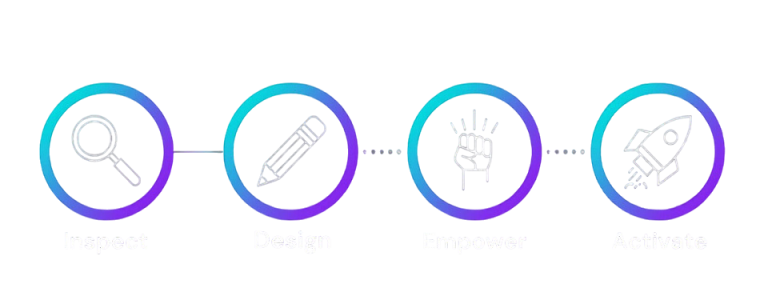
How Our Business Central Implementation Process Works

Inspect. Design. Empower. Activate.

Every Tecvia implementation follows the same four stages. You approve the key documents and tests before we move to the next stage.

Workshops First

We start with interactive workshops with your key people. You get a Functional Requirements Document that acts as the blueprint for your system.

Nothing Moves Without Your Sign-Off

You approve the requirements and the design before we build anything. That way, you always know what we're building and why.

Tested Before You Go Live

We run a full end-to-end test, then your team tests real scenarios. You go live only when you're satisfied.

Tecvia's four implementation stages: Inspect, Design, Empower and Activate
Stage 1: Inspect

1. Inspect

We start by learning how your business works. Through interactive workshops with your key people, we agree how each area should be set up and where it can improve. Where possible, we begin configuring the system at this stage.

The workshops produce a Functional Requirements Document, the blueprint for your whole solution. You approve it before we start the next stage.

Stage 2: Design

2. Design

Next, we design and build your solution. This stage covers:
• design and development work
• third-party app configuration and testing
• data migration
• test environment set-up

You approve the design before any development starts. Once the build is complete, we run an end-to-end test against the Functional Requirements Document and fix any issues.

Stage 3: Empower

3. Empower

Your team learns the system through a tailored training programme. We use a "train the trainer" approach, so only the relevant users need to attend.

After training, your team runs User Acceptance Testing (UAT). You test your own processes and scenarios against the system. Our project team resolves any questions or issues. When you're satisfied, we create a detailed Go-Live Plan with every task, date and time.

Stage 4: Activate

4. Activate

We prepare your live environment. This includes:
• deploying any developments
• final data migration and opening balances
• third-party app configuration
• final system configuration

You then go live, with support from our team throughout. The level of support depends on your project. We agree it in your Go-Live Plan. Shortly after go-live, we hold a project closure meeting to review the solution, the delivery and your next steps.

Business Central Support After Go-Live

Your support doesn’t end when Business Central goes live. The team that implemented your system stays on to answer questions, fix issues and help your people settle in.

Microsoft releases two major Business Central updates a year, in April and October. We explain what each one means for you and help you use the new features. Find out more on our Business Central support page.

Help as Your Business Grows

New requirements come up as your business changes. We add reports, workflows and extensions when you need them. Your system then keeps pace with the business.

A Support Team That Knows Your Business

When you call for help, you won't explain your set-up to a stranger. Your support team already knows your configuration, your processes and the customisations we built for you. That means faster fixes and advice that fits your business.

Knowledge Transfer, Not Dependence

We show your people how to handle routine tasks themselves. You also get the knowledge to make informed decisions about your system. That keeps your support costs down.

Already Live on Business Central?

You don't need to have implemented with us to get our support. We also take on existing Business Central systems through a simple partner transfer.

Book a Free Consultation

Contact Tecvia

What Happens Next

Business Central Implementation: Your Questions Answered

Business Central brings finance, sales, purchasing, inventory and manufacturing into one system. You work from a single set of data, which makes reporting faster and more reliable. It also connects with Outlook, Teams, Excel and Power BI. Because it runs in Microsoft’s cloud, you get two major updates a year without an upgrade project.

A Business Central implementation moves your business from its current systems onto Dynamics 365 Business Central. We follow four stages: Inspect, Design, Empower and Activate. Together, they cover discovery, configuration, data migration, testing, training and go-live. After go-live, the same team keeps supporting you.

It depends on your scope, your number of users and how much data you migrate. For example, a finance-only rollout moves faster than a multi-site manufacturing project. We agree a phased timeline with you at the end of the Inspect stage. That way, you know your go-live date before configuration starts.

Your cost depends on your number of users, the modules you need and how much data you migrate. Microsoft bills licences separately, per user per month. See our Business Central pricing page for current licence prices. We give you a written quote after the Inspect stage, so you know the cost before configuration starts.

Plan for your key users to attend workshops in the Inspect and Design stages, then test and train during Empower. You also need one project lead who can sign off decisions. We agree the time commitment up front, so you can plan around busy periods.

Yes. We configure standard Business Central first, then build extensions where your processes need more. Microsoft requires you to build customisations as extensions in Business Central online, so updates don’t overwrite your changes. We scope larger requirements as change requests and quote for them separately.

Yes. We migrate your master data, such as customers, vendors and items, along with opening balances and open transactions. If you’re moving from Dynamics NAV, our Migrate from NAV page explains the upgrade path. We test the migration before go-live, so your figures reconcile on day one.

We train your key users on the processes they will run every day. Training uses your own configured system and data. After go-live, you can book short follow-up sessions on specific topics through our support service.

The team that implemented your system stays with you after go-live. We handle fixes, questions, updates and new requirements. If you’re already live with another partner, we take on existing Business Central customers too. Visit our support page for details.