Power BI for
Business Central

Turn your Microsoft Dynamics 365 Business Central
data into actionable insights that drive better decisions

What Is Power BI for Business Central?

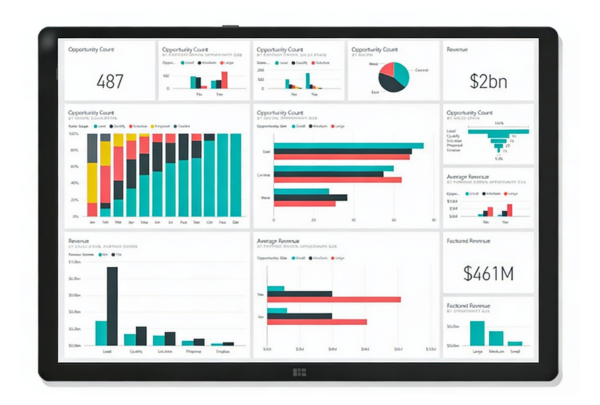
Power BI is Microsoft’s business intelligence platform. It connects directly to your Dynamics 365 Business Central system and turns your existing data into visual dashboards and reports. 

Your Business Central system already holds everything you need. Sales figures. Inventory levels. Customer orders. Financial transactions. Power BI pulls that data together and presents it in a format your team can read at a glance. 

You no longer need to wait until month-end to see what is happening in your business. Dashboards update throughout the day, so you are always working from current information. No manual spreadsheets. No data exports. 

Because Power BI is part of the Microsoft ecosystem, it works alongside the tools your team already uses, including Excel, Teams, and Outlook. See our Business Central features page for more on the platform’s reporting and analytics capabilities. 

How Power BI Connects to Business Central

Power BI connects to Business Central through built-in Microsoft connectors. There is nothing complicated to configure. You point it at your Business Central environment, and it starts reading your data. 

From there, your dashboards update automatically as your data changes. Each team in your business can have a view that is relevant to them. 

Finance Teams

Your finance team can see profit and loss, balance sheets, and expense tracking in visual form. Reports that previously took hours to compile update automatically, which reduces errors and frees up time.

Sales Teams

Sales managers can monitor regional performance in real time. They can see which areas are hitting targets and which need attention, without waiting for a weekly report.

Operations Teams

Your operations team can spot bottlenecks before they delay customer orders. Production output, fulfilment rates, and stock levels are all visible in one place.

Power BI for Manufacturing Businesses

Manufacturers face constant pressure to do more with less. You need to know where your production efficiency stands today, not last month. Power BI gives you that visibility directly from your Business Central data. 

Production Monitoring

Track machine utilisation and output across your shop floor. See which equipment runs at capacity and which sits idle, so you can act before it affects delivery.

Waste
Reduction

Monitor scrap rates by product line. Identify where material waste is eating into your margins, and track whether corrective actions are working.

Supplier Performance

Analyse which vendors deliver on time and which cause disruption. Use that data to make more informed decisions about your supply chain.

Labour Cost Analysis

Review labour costs per unit. Find out if overtime is eroding your margins and compare actual costs against budget across different production runs.

Find out more about how Business Central supports manufacturing businesses on our Manufacturing and Engineering industry page. 

Power BI for Distribution and Wholesale Businesses

Distribution is about speed and accuracy. Your customers expect fast delivery and correct orders. Power BI shows you exactly where problems occur so you can fix them before they affect your customers. 

Warehouse Efficiency

Measure picking accuracy and identify which products or processes cause errors. Use that information to reduce mistakes and speed up fulfilment.

Delivery Performance

Track delivery success rates by carrier. See which logistics partners meet their commitments and which consistently fall short.

Inventory Management

Monitor stock turnover rates and identify slow-moving inventory. Freeing up cash tied up in stock that is not moving is one of the fastest wins Power BI delivers for distributors.

Transport
Costs

Review transport costs per delivery. Identify routes or carriers that are cutting into your margins, and compare performance across your logistics network.

See how Business Central works for distributors on our Distribution and Wholesale industry page. 

Power BI for Food, Beverage, and Life Sciences Businesses

Power BI works across every industry Tecvia serves. Food and beverage businesses use it to monitor batch performance, track waste against production targets, and review supplier delivery accuracy. 

Life sciences and medical device businesses use it to track quality metrics, monitor compliance indicators, and report on batch release performance. Any data that sits in Business Central can be surfaced in a Power BI dashboard. 

Find out more on our Food and Beverage industry page or our  Life Sciences industry page

A drink production line with bottled juice.
BI VS Spreadsheets

Power BI vs Spreadsheets

Spreadsheets require manual effort. Someone has to export data, compile it, and build charts. By the time you see the results, the information is already out of date. 

Power BI updates automatically. Your dashboards refresh throughout the day, so your team always works from current figures. Multiple people can view the same dashboard at the same time, which means decisions are based on the same facts rather than different versions of a spreadsheet. 

Power BI also handles datasets that would slow a spreadsheet to a standstill. You can analyse years of transaction history without performance issues, and share reports across your organisation without email attachments or version conflicts. 

Why Business Central Customers Work With Tecvia on
Power BI

Tecvia specialises in Business Central for UK manufacturers, distributors, food and beverage businesses, and life sciences companies. We understand what data matters in your industry, and we build dashboards that answer the questions your business actually asks. 

We do not just set up the connection and hand it over. We work with you to define what you need to measure, build dashboards that reflect your processes, and train your team to use them confidently. 

Most clients have their first working dashboard within two weeks of starting. From there, you can expand to cover other parts of the business as your confidence grows. 

Talk to Us About Power BI

If you want to see what Power BI can do with your Business Central data, start with a conversation. We will show you what is possible and give you a clear picture of what implementation involves. 

FAQ

To help you navigate our Dynamics 365 Sales page more effectively, we’ve complied answers to some of the most frequently asked questions. If you have any additional questions or need further clarification, please don’t hesitate to contact us!

Power BI is Microsoft’s business intelligence platform. It connects directly to Dynamics 365 Business Central and turns your existing data into visual dashboards and reports. Your team can see real-time information on sales, finance, stock, and operations without manually exporting data. 

Power BI connects to Business Central through built-in Microsoft connectors. It reads your data automatically, with no manual exports required. Dashboards update throughout the day as your business data changes. 

Yes. Manufacturers use Power BI to track production efficiency, monitor scrap rates, analyse supplier performance, and review labour costs per unit. All of that data comes directly from Business Central, so there is nothing to set up separately. 

Yes. Distributors use Power BI to measure picking accuracy, track delivery performance by carrier, monitor stock turnover, and review transport costs per delivery. It gives you a clear view of where your operation is performing and where it is not. 

Power BI Pro costs £10.80 per user per month at the time of writing. Implementation costs vary depending on the number of dashboards required and whether you use external support to build them. Most businesses have their first dashboard live within two to four weeks. 

No. Dashboards are designed for business users, not technical teams. If your team can read Excel, they can use Power BI. Most users learn to navigate and interact with dashboards within a few hours. 

Most businesses have some data quality issues. You do not need perfect data to start. Beginning with one clean dataset, such as your sales figures, is usually the best approach. Power BI can also help you identify where your data has problems, which you can fix gradually. 

Your first dashboard can be live within days. A typical implementation, from the initial scoping conversation to a working dashboard, takes two to four weeks. The technical build is straightforward once you are clear on what you want to measure. 

Yes. Starting with one dashboard that answers your most pressing business question is the approach we recommend. Once you see the value, you can expand to other areas. This reduces risk and builds confidence in your team before you commit to a larger rollout. 

Excel reports require manual data exports and updates. Power BI connects directly to Business Central and updates automatically throughout the day. Everyone in your business sees the same live dashboard, which means decisions are based on current information rather than a spreadsheet that was last updated on Friday afternoon. 

Yes. Smaller businesses often benefit most from Power BI because they cannot afford to make decisions based on outdated information. A business with fifteen staff can access the same reporting capability as a much larger organisation. The platform scales to your size and complexity. 

For anything not covered here, get in touch directly. We’re happy to answer questions specific to your business and your ERP requirements.