Overview
Managing batch traceability and shelf life is one of the biggest operational challenges in food and beverage manufacturing. This post explains how Dynamics 365 Business Central handles both, and when a specialist add-on like YAVEON is the right next step.
The problem with poor batch visibility
Most food and beverage manufacturers understand the theory of batch traceability. Many struggle with the reality.
When product moves across goods receipt, production, quality holds, and despatch, tracking it accurately depends entirely on whether your systems share data in real time. Without that, you are relying on spreadsheets, paper records, or fragmented software that cannot give you a complete picture fast enough.
That matters when a supplier flags a contamination issue and you need to know, within hours, which orders are affected.
The Food Standards Agency requires food businesses to maintain complete traceability records under Regulation (EC) No 178/2002. BRCGS audits require the same as a standard condition of certification. When those records are spread across disconnected systems, building a compliant audit trail takes time you often do not have.
The stakes are financial as well as regulatory. A product recall without clear traceability data can mean withdrawing more stock than necessary, or missing affected batches entirely, which is far worse.
What Business Central does natively
Dynamics 365 Business Central handles lot tracking without third-party add-ons. You assign lot numbers at goods receipt, and those numbers follow the product through every stage: production, quality inspection, storage, and outbound shipment.
The system supports expiry date management at item level or lot level. Business Central can enforce FEFO (First Expiry, First Out) picking logic automatically, which means your warehouse team does not need to check dates manually. The system directs picks to the nearest-expiry lot first.
That matters in practice because FEFO errors are a common cause of avoidable waste. Stock moves in the wrong order, older product sits at the back of the rack, and you write off inventory that was still sellable a week earlier.
Business Central also supports lot-specific quality holds. If a batch fails an inspection or arrives from a flagged supplier, you can block it from shipping before it reaches a picking zone. For businesses managing warehouse complexity, this works alongside our warehouse management setup in Business Central, including bin-level stock control.
Item tracing: the recall scenario in practice
The feature most likely to matter in a high-pressure situation is Item Tracing. It lets you run a full forward and backward trace on any lot number in seconds.
Here is a realistic example. A supplier contacts you on a Tuesday morning. They have identified a potential quality issue with a batch of tinned tomatoes supplied three weeks ago. You need to know where that stock went.
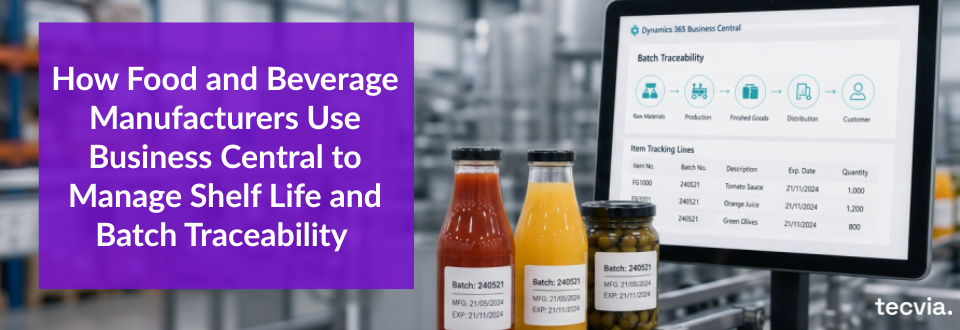
In Business Central, you open Item Tracing, enter the lot number, and run a forward trace. The system shows every internal movement that lot has made: from goods receipt to goods-in inspection, to the production order it was consumed in, to the finished goods lot it became, and to the sales orders it shipped on.
You can see which customers received product from that batch, when it shipped, and whether any of it is still in your warehouse. That information is available immediately. You are not making phone calls to the warehouse team or waiting for someone to pull paper records.
Shelf life management across multiple lines
Shelf life management gets more complex when you manufacture across multiple product lines with different date requirements.
Business Central lets you configure expiry date tolerance at item level. You can set a manufacturing date, a best before date, and a use-by date separately. You can also define what percentage of remaining shelf life is acceptable at the point of goods receipt.
That is useful when you work with contract manufacturers or co-packers. You can reject incoming stock that falls below your minimum shelf life threshold at receipt, before it enters your inventory and creates a downstream problem.
Quality inspections: what changed in 2026
Microsoft released a Quality Management extension in the 2026 release wave 1 update, and it covers ground that previously needed a third-party add-on.
The extension is published by Microsoft and installs automatically on new environments. On existing environments you add it from the Marketplace. It provides quality inspection templates with pass and fail criteria, inspections generated automatically on purchase receipt and on production or assembly output, lot blocking based on inspection results, quarantine bin handling, and Certificate of Analysis reporting.
Two things are worth knowing. Production output inspections require the Premium licence rather than Essentials. And an extension is not the same as base functionality, so it is a decision to make at implementation rather than something that is simply there.
When you need to go further than standard Business Central
Native Business Central covers the fundamentals well, and covers more of them than it did a year ago. For some food and beverage businesses, the fundamentals are enough. For others, the operation demands more.
YAVEON is the partner Tecvia uses when clients need capabilities that go beyond what standard Business Central provides. Their food and beverage products extend Business Central in areas that come up regularly:
Electronic batch records. Business Central does not generate a formal batch record document automatically. For manufacturers closing a production run under audit conditions, a signed-off electronic batch record is a practical requirement rather than a nice-to-have.
Catch weight handling. For manufacturers selling by nominal weight but receiving or producing at variable weight, such as fresh meat, cheese, or produce, native Business Central is limited. YAVEON records actual weight at each stage and reconciles it against the nominal unit.
Allergen management. YAVEON manages allergen data at ingredient and recipe level, so you can run allergen reports, flag production scheduling conflicts, and produce product documentation without maintaining a separate spreadsheet alongside your ERP.
Supplier approvals and evaluation. Approved supplier registers and supplier scoring sit outside standard Business Central. YAVEON adds them alongside inspection plans and Certificate of Analysis matching.
What this means for audits
Business Central gives you a single source of record for all lot movements. When an auditor asks for the traceability file for a specific batch, you produce it directly from the system rather than consolidating it by hand.
You can also run a mass balance check, comparing the quantity of a lot received against the quantity consumed in production and despatched to customers, to confirm your records are consistent.
Business Central is a system of record rather than a certification. Whether your setup satisfies a particular standard depends on how it is configured and what your certification body expects, which is part of what an implementation should establish.
Getting the setup right
Lot tracking in Business Central works well when it is configured correctly from the start. The key decisions at implementation stage are: which items require lot tracking, how expiry date tolerances are set, which warehousing approach fits your operation, and whether your process manufacturing requirements mean a specialist add-on should be part of the initial scope.
Getting those decisions wrong creates problems that are hard to fix later. If lot tracking is switched on inconsistently, or expiry dates are not enforced at goods receipt, the data you are relying on for audits and recalls will have gaps.
The right configuration at the start means fewer manual workarounds, cleaner audit trails, and a system your team will use without working around it.
Talk to Tecvia about Business Central for food and drink
If your current system makes batch traceability difficult, or you are preparing for an audit and know your records are not where they need to be, we can help. Contact us to talk through your requirements.
You can also read more about Business Central for food and drink manufacturers, our implementation service, and the partners we work with.