Overview
This post covers how document capture for Business Central works, based on our live webinar with Continia. It follows an invoice from arrival to approval, posting and archive. Later, the post looks at the UK e-invoicing mandate and what it means for your accounts payable team.
Key Takeaways
- Document capture reads supplier invoices with AI and enters the data into Business Central for you.
- You set up each vendor once. Later invoices from that vendor can then process automatically.
- Matching works at total level, at line level or manually, with tolerances you set per supplier.
- Approvers can sign off in Business Central or in a web portal on a phone or tablet.
- Every invoice sits in a searchable archive and appears on the vendor card, ledger and posted invoices.
- UK e-invoicing becomes mandatory on 1 April 2029, so your capture tool must handle structured invoices.
Document capture for Business Central removes manual typing from supplier invoice processing. On 4 November 2026, we ran a live webinar with Martijn Holterman from Continia to show how it works. This post walks through what he demonstrated. It also explains what the 2029 UK e-invoicing mandate means for your finance team.
Watch the Webinar Recording
You can watch the full 32-minute session below. It includes the live demonstration of every step in this post, from the first invoice to the final archive search.
Why Manual Invoice Entry Slows Your Finance Team
Most accounts payable teams still key invoice data by hand. Someone opens a PDF, reads the supplier name and copies the amounts into the system. Then they check the figures against a purchase order. Each step takes time and invites mistakes.
Consider an illustrative example, not a cited figure. Suppose your team receives 500 invoices a month and each takes five minutes to enter. That adds up to 2,500 minutes, or roughly 42 hours of typing every month.
Business Central already covers purchasing well. Its purchasing features track orders, receipts and ledgers in one system. However, invoices still arrive as PDFs and emails, so someone has to key them in. Document capture removes that step.
How Document Capture for Business Central Works
Continia builds Document Capture directly inside Business Central. It does not connect through an API. Because of this, your team works in screens they already know, so training stays short.
Invoices reach the system in three ways. You can scan paper invoices and press a button. Alternatively, the tool can monitor a shared mailbox, such as [email protected]. Or you can receive e-invoices through the Peppol network.
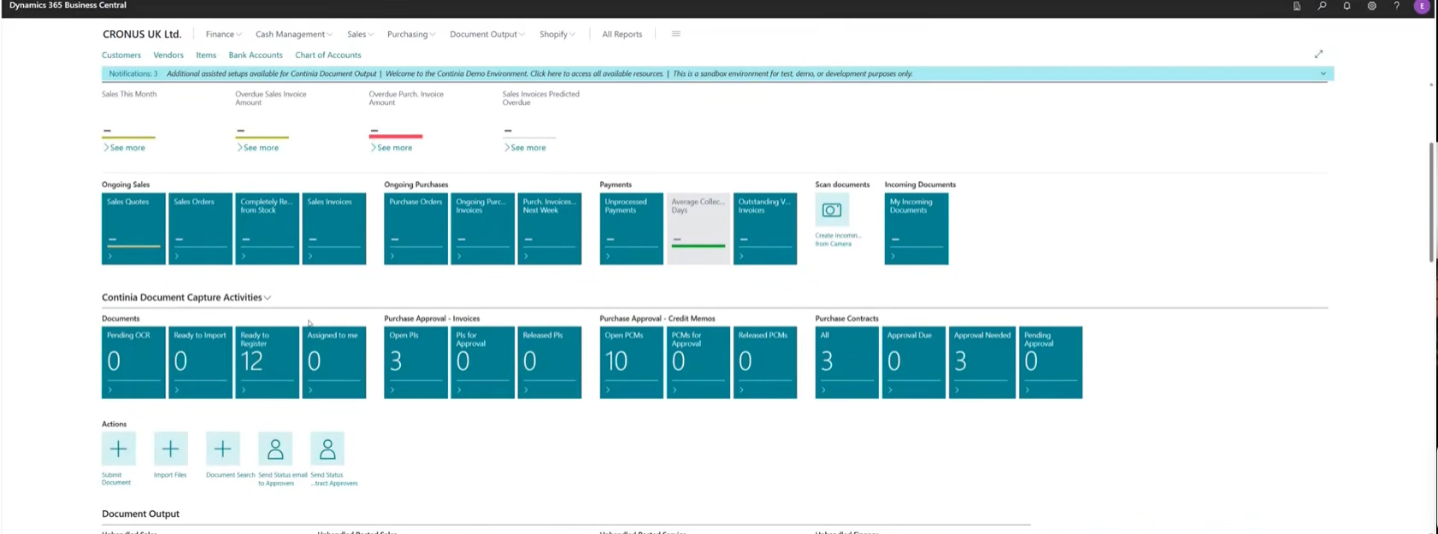
In the demo, Martijn emailed several invoices to a test mailbox. They appeared in Business Central within about ten seconds. AI-powered OCR then read each one and extracted the data.
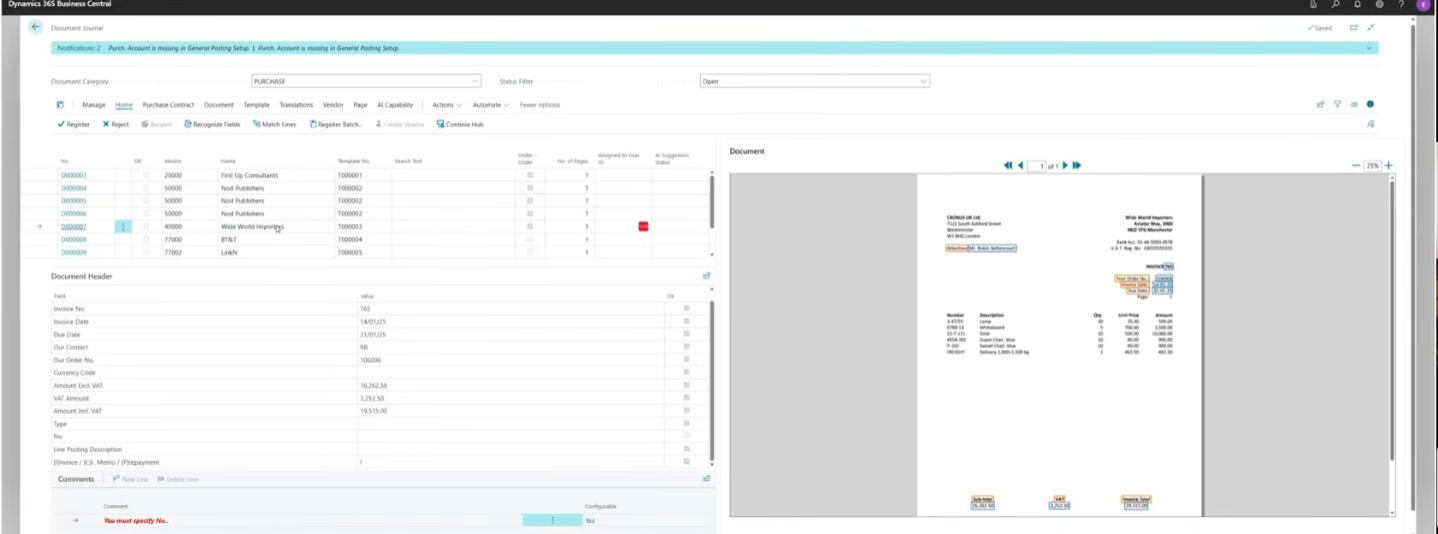
One screen shows the original invoice on the right and the captured data in the middle. Your to-do list sits at the top left. If you click a field, the screen shows where the software found that value.
Setting Up Each Vendor Once
You define how each vendor works one time. For example, you can tell the system that a supplier sends cost invoices coded to a specific general ledger account. After that, invoices from that vendor can process without your input.
The system also learns from corrections. If it misreads an invoice number, you fix it once. It then builds a template, so the same error does not return.
Martijn set up a first vendor during the demo. He said your team can do this in about 30 seconds after a couple of days of training with Tecvia. A second invoice from that vendor registered straight away, with the ledger account already filled in.
The software checks due dates against your payment terms. It also handles multiple VAT rates on one invoice, including reverse VAT. For invoices with many lines, it keeps capturing until it finds no more, whether that is three lines or one hundred.
You can add your own fields as well, such as dimensions or bank account checks. Bespoke fields built with Tecvia also appear here. Your team can add them without a developer.
Capturing Every Invoice Line With AI
Invoices with many lines used to mean a lot of typing. In the demo, Martijn set the Recognize Lines option to AI. The software then captured every line without further input.
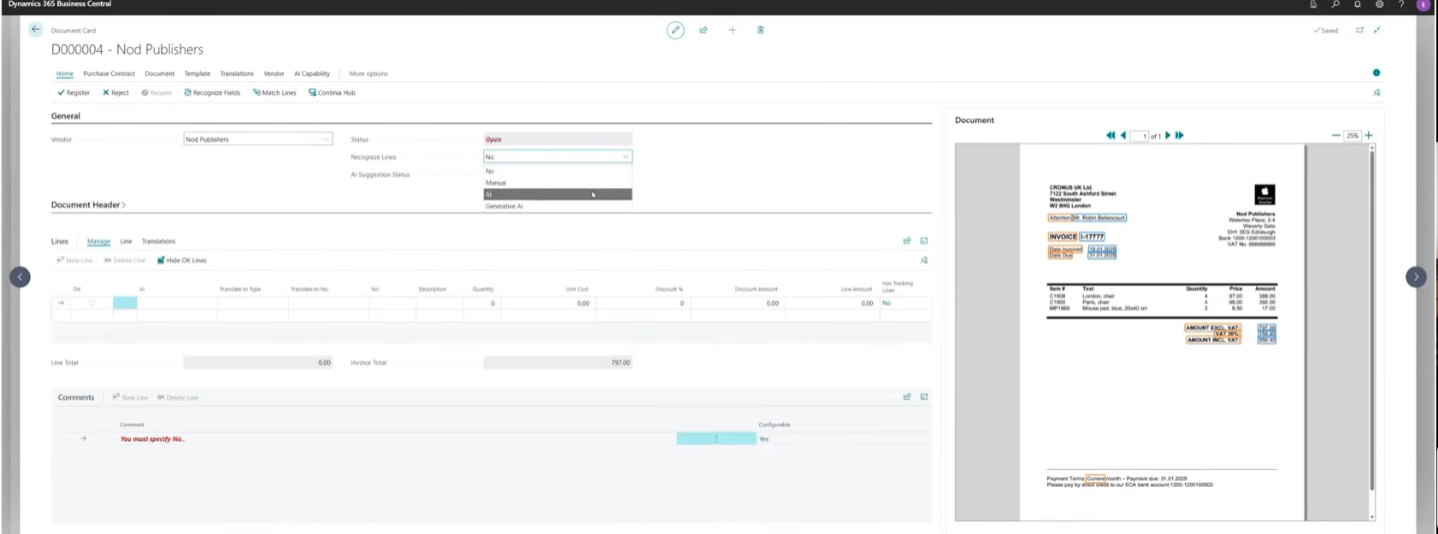
Your supplier may use a different item number from yours. You tell Document Capture once, and it remembers the match for next time. It uses the cross-reference table in Business Central, so you can skip this step if that table is already filled in.
You can code each line to an item, a general ledger account, a resource, a fixed asset or a charge item. AI can also help with item translations. After Martijn coded the lines, the invoice registered as three separate lines instead of one.
The same setup works in your test environment. You can then move it to live without repeating the work.
Matching Invoices to Purchase Orders
Purchase order matching is a key strength of Document Capture. It offers three methods.
- Total amount matching. The system compares the invoice total with the purchase order total. It works quickly, but it cannot tell a Lenovo laptop from a Dell one.
- Line level matching. The system checks quantities and prices on each line. It supports partial matches and several orders on one invoice.
- Manual matching. Your team picks the order when a supplier leaves off the purchase order number.
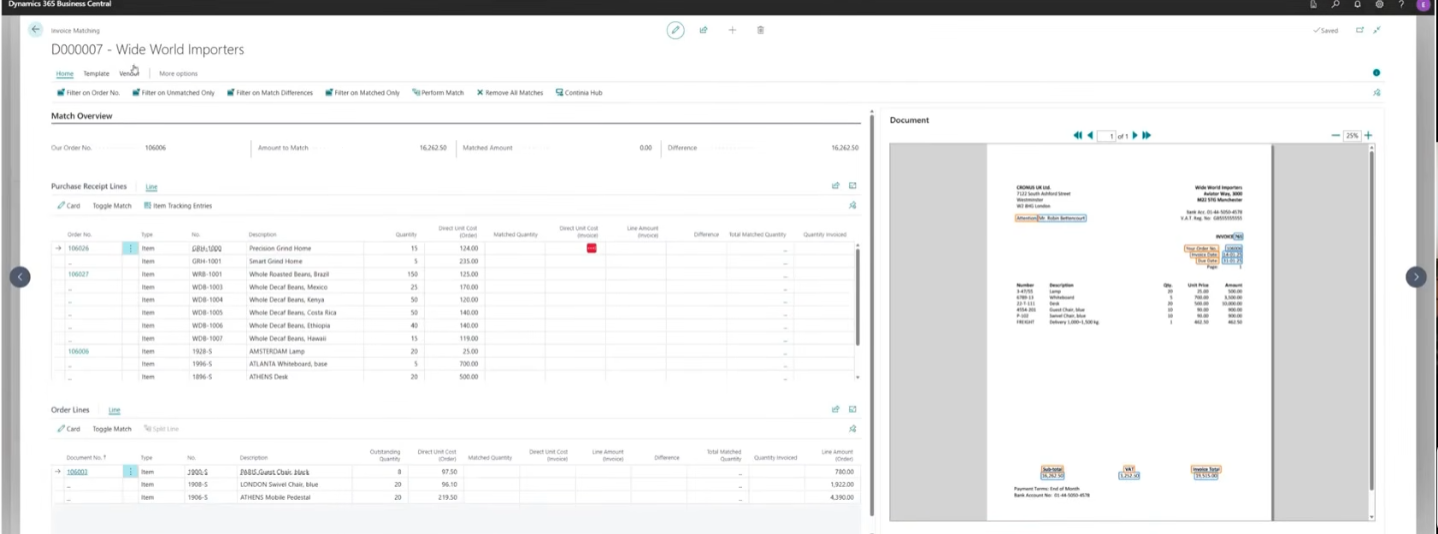
Line level matching also supports tolerances per supplier and per line. You can skip approval when the match is 100%. If a difference appears, the system marks the line in red, so your team spots it at once.
Clear messages explain the result, such as fully matched, partially matched, or not matched because goods have not arrived. Our guide to purchase order approvals in Business Central explains how three-way matching fits alongside this.
Approving Invoices on Any Device
You can build approval flows around how your business works. One method sets limits per approver. For example, one person approves up to £1,000, a supervisor up to £5,000 and a director up to £10,000.
You can also assign fixed approvers to each vendor, or route invoices by dimension, such as cost centre. Many businesses combine these methods.
Approvers can work in Business Central or in a web portal. The portal runs on a phone or tablet anywhere with an internet connection. They can approve, reject with a reason, forward an invoice or put it on hold.
The system logs every comment and decision from start to finish. Accountants can later see exactly what happened to any invoice. Approvers can also set an out-of-office, which forwards their approvals to a colleague.
After approval, invoices move to released status. You can post them one by one, in a batch or on a schedule, such as every day at 6am. Faster posting also helps your month-end close.
Finding Any Invoice in Seconds
Document Capture gives you a digital archive. Your organisation holds the files, not Continia. You can store them in the Business Central database, but Continia recommends Azure Blob Storage.
With Azure Blob Storage, you rent space in a Microsoft data centre of your choosing. A UK location keeps your data close and supports GDPR requirements.
You can search the full text of every scanned invoice. Type a product name, and the system returns every invoice that mentions it. A preview shows beside the captured data, and you can open the original email.
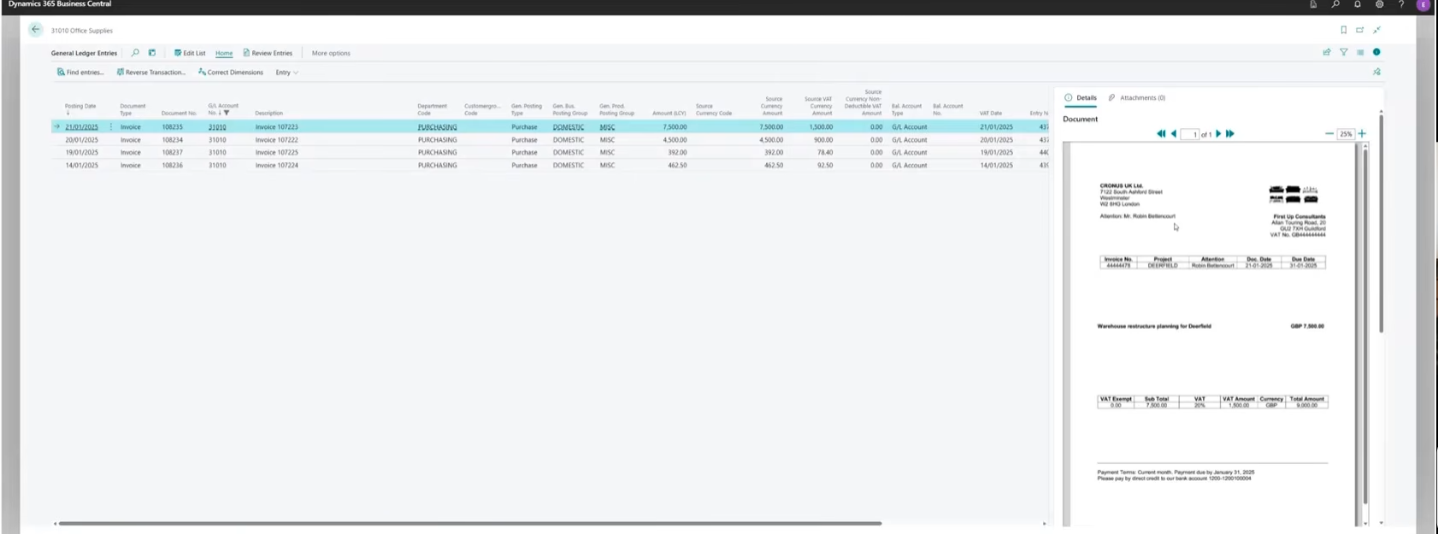
Invoices also appear wherever they touch Business Central. You can open them from the chart of accounts, the vendor card, posted purchase invoices and VAT entries. Colleagues and auditors find documents without asking finance to search folders.
Preparing for UK E-Invoicing in 2029
UK e-invoicing becomes mandatory for VAT invoices on 1 April 2029. The rule covers business-to-business and business-to-government transactions. HMRC does not count PDFs, Word files, scanned images or OCR-derived files as e-invoices.
Martijn explained that Continia is a certified Peppol access point. This means Continia can onboard you to the Peppol network. Document Capture then receives structured invoices, and Document Output sends yours.
Martijn noted that Poland and France already run their own variants of Peppol. HMRC has yet to confirm every technical detail for the UK. Our guide to UK e-invoicing and the 2029 mandate tracks the latest position.
Where Document Capture Helps Most
Document capture suits any business with steady supplier invoice volumes. Distributors often receive many invoices against purchase orders. Our Business Central for distribution and wholesale page shows how this fits alongside stock and order management.
Manufacturers buy materials and services from many suppliers. Our manufacturing and engineering page covers how Business Central supports that. Food and beverage producers can read the same detail on our food and beverage page.
Continia also offers expense management, document output, banking and a finance toolbox. All of them work inside Business Central. You can add them later as your needs grow.
What This Means for Your Business
Document capture cuts the typing, speeds up approvals and gives you a searchable archive. It also prepares you for e-invoicing in 2029. You can automate at your own pace, starting with manual registration and approval, then switching each step to automatic.
First, test your setup in a test environment. After that, you move it to your live environment without repeating the work.
Contact Tecvia to arrange a demonstration for you and your team. You can also explore our Business Central features to see how document capture fits the wider system.