Overview
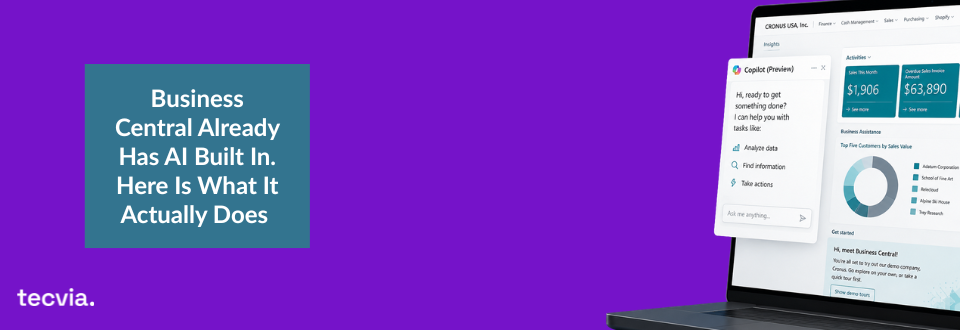
Most Business Central users assume AI is a separate product they need to buy, request from IT, or configure from scratch. This post explains what Microsoft Copilot actually does inside Business Central today, covers the four main areas where it saves time, and introduces agents as the point where AI stops assisting and starts acting.
The Misconception Worth Clearing Up
The Misconception Worth Clearing Up
If you use Microsoft Dynamics 365 Business Central on any paid plan, you already have Copilot. There is nothing to buy, no third-party tool to connect, and no IT project to kick off. Microsoft builds Copilot directly into the platform, so it works with your live data from the moment you log in.
That surprises a lot of users. Many businesses assume AI is always an add-on, something that sits alongside their ERP rather than inside it. But Copilot in Business Central is part of the subscription, not an optional extra. The more relevant question is not whether you have it. It is whether you are actually using it.
What Copilot Does Inside Business Central Today
Copilot in Business Central covers four broad areas of everyday work. Each one removes friction from tasks your team already does, so the time saving is immediate and practical.
Find and Ask
You can type a question in plain language and Business Central returns an answer drawn from your live data. Ask for overdue invoices, slow-moving stock, or production orders running behind schedule, and the answer appears directly, without report-building or manual data pulls. This matters especially for manufacturers and distributors because the data is already in the system. Copilot removes the step between having data and being able to read it quickly.
Draft and Create
Copilot can generate product descriptions for your e-commerce store directly inside Business Central. You provide the item attributes and it produces copy in seconds. It also drafts sales orders from email conversations, which reduces manual entry and speeds up order processing.
For teams handling high volumes of items or orders, these are not small gains. Because the drafting happens inside the system, there is no need to export data, open a separate tool, or copy text back in.
Summarise and Explain
Long customer communications and supplier documents can be summarised in a single click. Copilot reads the content and returns a concise version, so your team sees what matters without reading everything in full. This is particularly useful in purchasing and sales, where staff process a high volume of emails and documents daily. After a quick review, they can act on the summary rather than work through the original.
Analyse and Insight
Copilot flags unusual transactions and patterns automatically, which means your finance team can focus on exceptions rather than scan manually for anomalies. It also provides intelligent reorder suggestions based on demand patterns, stock levels, and supplier lead times. Rather than running a report and then interpreting it, your team receives a prompt that draws attention to something worth looking at.
The Shift: From Assisting to Acting
Everything above describes Copilot as an assistant. It helps your team do things faster. It drafts, summarises, suggests, and surfaces information when someone asks. That is already useful, but it still requires a person to ask.
Agents are different. An agent does not wait to be prompted. It monitors, decides, and acts within defined rules, based on what is happening in your data. If you want to understand the broader concept, our post on what agents in Microsoft Copilot actually are explains this in full.
The distinction matters because it changes what AI can actually do for your business. Copilot assists. Agents act. That is the line between AI that saves your team a few minutes and AI that completes a task while they are focused on something else. Microsoft now includes three built-in agents in Business Central, and none of them require additional configuration. They are part of the platform.
The Three Built-In Agents in Business Central
The Sales Order Agent
The Sales Order Agent reads incoming orders, whether submitted by email, a customer portal, or another channel, and creates the corresponding record in Business Central. It checks stock availability, applies the correct pricing, and flags exceptions for human review. So your sales team no longer processes routine orders line by line. They review the exceptions and spend their time on relationships instead.
The Finance Agent
The Finance Agent works across accounts receivable and payable tasks. It matches bank transactions to open entries, proposes reconciliation suggestions, and flags discrepancies that need a human decision. Because reconciliation is one of the most time-consuming routine tasks in a finance team, the time saving here is significant and immediate.
The Purchasing Agent
The Purchasing Agent monitors stock levels and demand signals, then raises purchase order suggestions when replenishment is needed. It applies your reorder rules and preferred supplier data already held in Business Central. Your purchasing team reviews and approves the recommendations rather than building them from scratch.
Across all three agents, the principle is the same. They complete defined, repeatable work within the boundaries you set, and a person stays in control of the approval step. The agent handles the groundwork.
Why This Matters Now
Many businesses are waiting for AI to become relevant to them. But for Business Central users, it already is. As we covered in our post on why most teams aren’t using Copilot properly, the tools are built in, the data is already there, and the agents are running on the same platform your team uses every day.
The businesses seeing real returns are not the ones with the most advanced AI strategy. They are the ones that identified a handful of high-volume, repeatable tasks and stopped doing them manually. Order processing, bank reconciliation, and purchasing replenishment are three obvious starting points because the volume is high and the process is consistent, which is exactly where agents perform best.
Getting started does not require a long project. It requires knowing which features are active on your system, mapping them to the workflows where they fit, and giving your team a clear picture of what they can do. If you think your business might be holding onto some common misconceptions about AI, our post on AI myths businesses need to stop believing is worth a read too.
Talk to Tecvia About Getting More from Business Central
Copilot and the built-in agents are already part of your Business Central subscription. But knowing they exist and getting genuine value from them are two different things. Tecvia helps manufacturers and distributors configure Business Central with Copilot fully active, so your team starts using AI from go-live. If you would like a demo or a conversation about where Copilot agents could save your team the most time, get in touch with Tecvia today.