Overview
This guide covers the four phases, realistic timelines and cost drivers of a Business Central implementation for UK SMEs in 2026. It also includes a worked first-year cost example. Use it to build a realistic project outline before you speak to a partner.
Key Takeaways
- A Business Central implementation follows four phases: Inspect, Design, Empower and Activate.
- Most UK SME projects take three to twelve months, depending on scope, users and data.
- Licences are only one cost, because partner fees, data migration, training and support also count.
- Panorama Consulting found that more than a quarter of ERP projects exceeded budget, with unplanned technology needs the most common cause.
- Dynamics GP and NAV customers should plan early, because experienced partners may get busier as deadlines approach.
- Clean data and documented processes prepare your business for Copilot and AI agents.
Why Business Central Implementation Looks Different in 2026
A Business Central implementation in 2026 needs more planning around data than it did a few years ago. Microsoft keeps adding Copilot and agent features. Those features only help when your data is clean, so your plan must cover data quality as well as configuration.
For example, duplicate customer records can confuse an AI agent just as they confuse your staff. Our guide to the AI already built into Business Central shows what you can use today.
Migration deadlines add pressure too. Microsoft stopped selling new Dynamics GP subscriptions on 1 April 2026. Product updates for GP end on 30 September 2029, according to Dynamics Communities.
As a result, experienced consultants may get busier, so start your conversations early. NAV customers face their own dates, which our NAV end of support guide covers. If you run NAV, our Migrate from NAV page explains the upgrade path.
Compliance changes are further out but still affect your design. The UK e-invoicing mandate arrives in 2029, so review your invoice workflows during the Inspect phase. Our e-invoicing guide explains what to prepare.
The Four Phases of a Business Central Implementation
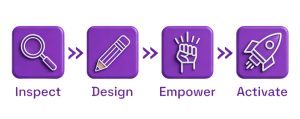
We run every Business Central implementation through four phases. You approve the key documents and tests before each phase closes.
Phase 1: Inspect
We start with workshops that map how your business works today. Your key people attend, so decisions come from the team that runs the processes. The workshops produce a Functional Requirements Document, which you approve before we build anything. We also agree your timeline and written quote at the end of this phase.
Phase 2: Design
Next, we design and build your solution. You approve the design before any development starts. This phase covers development work, third-party app set-up, data migration and test environment preparation. Afterwards, we run an end-to-end test against your requirements document and fix any issues.
Phase 3: Empower
Your team learns the system through tailored training. We use a train-the-trainer approach, so only relevant users attend. Your people then run User Acceptance Testing against their own processes. When your team signs off the tests, we write a detailed Go-Live Plan listing every task, date and time.
Phase 4: Activate
We prepare your live environment, deploy developments and complete final data migration with opening balances. You then go live with our team beside you. The Go-Live Plan sets the level of support. Shortly after go-live, we hold a project closure meeting to review the delivery and your next steps.
How Long Does a Business Central Implementation Take?
Most UK SME projects take three to twelve months. Scope, users and data decide where yours lands. These illustrative timelines show how scope changes the picture:
Project scope | Typical duration |
Finance and inventory for a small team | 3 to 5 months |
Distribution with warehouse management and ecommerce links | 5 to 8 months |
Multi-site manufacturing with custom workflows | 8 to 12 months or more |
For comparison, Panorama Consulting’s 2026 ERP Report found a median ERP project timeline of nine months. However, the survey covered 170 organisations with a median revenue above $200 million. So smaller projects may run shorter.
Your own team affects the timeline more than most buyers expect. Panorama found that organisational resistance, such as delayed sign-offs, was the most common cause of schedule overruns. Name a project lead who can approve decisions quickly.
Budget your team’s time too, because workshops, testing and training all need key users. Ask your partner to estimate the hours each person must commit. We never put a date on a project before we understand its scope. Instead, we agree a phased timeline with you at the end of the Inspect phase, so you know your go-live date before configuration starts.
What Drives the Cost of a Business Central Implementation
Licence Costs
Licences form the visible part of your budget. Essentials costs £61.50, Premium costs £84.60 and Team Member costs £6.20 per user each month. Our pricing page lists current figures and what each licence includes.
For example, 20 Essentials users and five Team Member users cost £1,261 a month, or £15,132 a year. Treat this as an illustrative calculation, because Microsoft can change prices.
Partner Fees and Other Costs
Beyond licences, your budget should cover these items:
- Partner fees for workshops, configuration and project management.
- Data migration, including opening balances and open transactions.
- Customisation and integrations, such as Shopify or Power BI connections.
- Training and user acceptance testing for your team.
- Support after go-live.
Your pricing model also affects the total. Our guide to fixed cost versus variable cost pricing explains the trade-offs. Panorama found that unplanned technology needs topped the causes of budget overruns, so define your integrations early.
A Worked First-Year Example
Here is an illustrative year-one budget for the 25-user team above. The services figure is an assumption, not a Tecvia price.
Cost item | Illustrative amount |
Licences for 12 months | £15,132 |
Partner services (assumed quote) | £40,000 |
Contingency at 15% of services | £6,000 |
Year-one total | £61,132 |
Hold a contingency because scope often shifts after workshops. Your own quote depends on your scope, data and integrations. Our article on why project costs exceed quotes explains the causes.
How to Avoid Delays and Budget Overruns
Most overruns trace back to decisions you make before the project starts. These steps reduce your risk:
- Document your current processes before the Inspect workshops.
- Name one project lead with authority to sign off decisions.
- Clean your customer, vendor and item data before migration.
- Map each requirement to a standard feature first, using our features overview. Then build custom work only for the gaps.
- Freeze scope after design approval and route changes through change control.
What to Ask a Partner Before You Sign
Your choice of partner shapes your timeline as much as your scope does. Ask these questions before you sign:
- Who will run my project from workshops to go-live?
- How do you price and approve change requests?
- What does the quote exclude, such as training or integrations?
- Who supports us after go-live, and how quickly do they respond?
Clear answers show whether a partner has delivered projects like yours. Sector knowledge also shortens the Inspect phase, because we already understand your regulations and workflows. We work with manufacturing and engineering, distribution and wholesale and life sciences businesses, as well as food and beverage and medical devices. Life sciences projects face extra validation work, as our GMP Annex 11 guide shows.
For selection advice, read our guide on choosing an ERP system. Our guide to moving to Business Central lists the help available during the switch.
What This Means for Your Business
A Business Central implementation in 2026 rewards preparation. Clean data, a named project lead and a clear scope shorten your timeline and protect your budget. Partner demand may rise as migration deadlines approach, so start your conversations early.
List your processes, users and integrations first, because these three items drive most of your cost and timeline. Our free systems and process review gives you a practical starting point.
Plan Your Business Central Implementation with Tecvia
Next Step
We give you a written outline with cost and timescale once we understand your requirements. Contact our Manchester team to book a free consultation. You can also read how our implementation process works from discovery to go-live.